
The problem every BC developer knows
You need to pull data across four tables in Business Central — customers, sales invoices, customer ledger entries and detailed ledger entries. In SQL Server, that's a straightforward SELECT with three INNER JOINs. In the Business Central world, your options have traditionally been:
- Build a custom API page or query object — compiles, publishes, deploys. Repeat every time the question changes.
- OData $expand and $filter — limited nesting, no real JOINs, and filter syntax that fights you on anything beyond simple equality.
- Ask your DBA for a direct SQL connection — possible on-premises, impossible on SaaS, and always politically expensive.
- Export to Excel and VLOOKUP your way to an answer — the most common path, and the most error-prone.
None of these let you simply ask the data a question and get the answer in seconds. That's what SQL Bridge does.
What SQL Bridge actually is
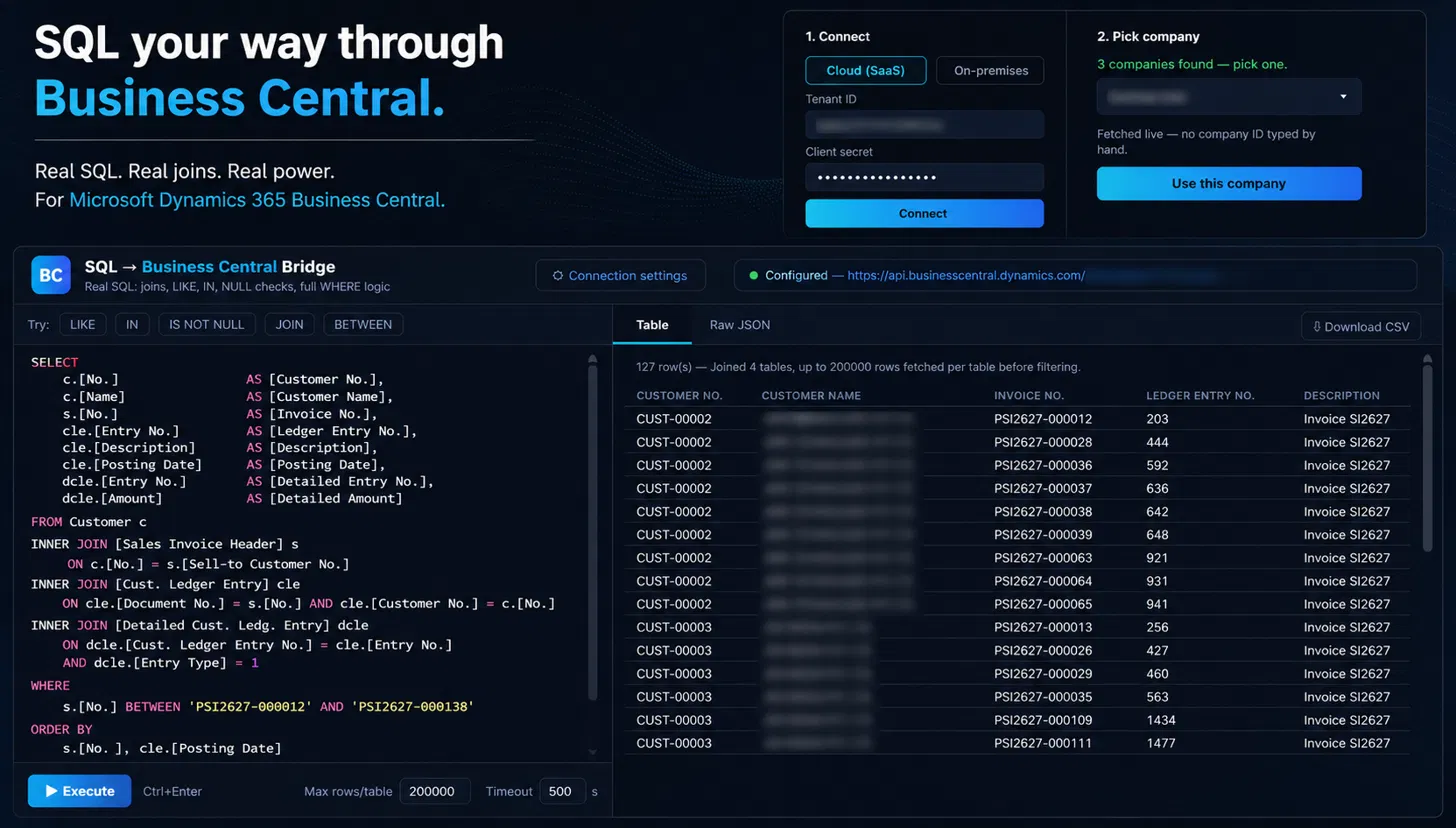
SQL → Business Central Bridge is a standalone web application that translates real SQL — the kind you'd write in SQL Server Management Studio — into Business Central API calls, executes them against your live tenant, and returns the joined result set. You write SQL. It handles the rest.
Real SQL. Real joins. Real power. For Microsoft Dynamics 365 Business Central.
It connects to both Cloud (SaaS) and on-premises environments. For SaaS, you authenticate with a Tenant ID and Client Secret via OAuth; for on-prem, it connects through your configured BC endpoint. In either case, the tool fetches available companies from your environment and lets you pick one from a live dropdown — no company ID typed by hand.
What you can write
SQL Bridge supports a substantial subset of SQL that covers the queries BC developers and consultants actually need to run. This isn't a toy that handles SELECT * and nothing else.
Multi-table JOINs
INNER JOIN across any number of BC tables. Join Customer to Sales Invoice Header to Cust. Ledger Entry to Detailed Cust. Ledg. Entry — all in one query.
Full WHERE logic
LIKE, IN, IS NOT NULL, BETWEEN, AND, OR — real predicate logic against any field, including date fields and decimals.
Column aliases
AS [Customer No.], AS [Ledger Entry No.] — clean, readable output columns, just like you'd write in SSMS.
ORDER BY
Sort by any field or combination of fields. Multi-key ordering works exactly as you'd expect.
You'll see quick-start buttons in the UI — LIKE, IN, IS NOT NULL, JOIN, BETWEEN — that drop example clauses into your query so you don't have to look up the syntax. But the editor accepts free-form SQL, so experienced developers can just type.
A real example
Here's an actual query that runs in SQL Bridge, joining four tables to show customer invoice details with their ledger entries:
SELECT
    c.[No.]                   AS [Customer No.],
    c.[Name]                  AS [Customer Name],
    s.[No.]                   AS [Invoice No.],
    cle.[Entry No.]           AS [Ledger Entry No.],
    cle.[Description],
    cle.[Posting Date],
    dcle.[Entry No.]          AS [Detailed Entry No.],
    dcle.[Amount]             AS [Detailed Amount]
FROM Customer c
INNER JOIN [Sales Invoice Header] s
    ON c.[No.] = s.[Sell-to Customer No.]
INNER JOIN [Cust. Ledger Entry] cle
    ON cle.[Document No.] = s.[No.]
    AND cle.[Customer No.] = c.[No.]
INNER JOIN [Detailed Cust. Ledg. Entry] dcle
    ON dcle.[Cust. Ledger Entry No.] = cle.[Entry No.]
    AND dcle.[Entry Type] = 1
WHERE
    s.[No.] BETWEEN 'PSI2627-000012' AND 'PSI2627-000138'
ORDER BY
    s.[No.], cle.[Posting Date]
That query joined four tables, returned 127 rows, and fetched up to 200,000 rows per table before filtering. The result appears in a clean, sortable table — or you can switch to the Raw JSON tab for programmatic use, or hit Download CSV to export straight to a spreadsheet.
How it works under the hood
SQL Bridge doesn't connect directly to your SQL Server database. Instead, it parses your SQL statement, resolves table and field names against the live BC schema, decomposes the query into BC API calls (one per table), fetches the data, and performs the JOIN logic client-side. This means:
- No direct database access needed — works with SaaS tenants where you have zero SQL Server access.
- Live schema resolution — table and field names are resolved against your actual BC metadata, not a static mapping file. If a field exists in your environment, SQL Bridge knows about it.
- No data leaves your session — the query executes in your browser. Nothing is stored server-side.
Cloud and on-premises, same experience
The connection panel gives you two modes — Cloud (SaaS) and On-premises. For cloud, you enter your Tenant ID and Client Secret. For on-prem, you point it at your BC endpoint. Either way, you get the same SQL editor, the same query engine, and the same output formats.
Once connected, SQL Bridge shows a green status indicator confirming the API endpoint, and lists the companies available in your environment. Pick one, and you're writing SQL against live data within seconds.
⚡ Performance note
SQL Bridge fetches up to 200,000 rows per table with a configurable timeout (default: 500 seconds). For most analytical and diagnostic queries, this is more than enough. The max rows and timeout are adjustable in the UI footer.
Who this is for
SQL Bridge sits at the intersection of BC development and data work. It's useful to anyone who has ever thought "I just want to query this data directly":
- BC developers debugging posting routines, verifying ledger entries, or validating that an integration wrote the right data.
- Functional consultants doing fit-gap analysis, validating migration data, or answering client questions without building a report object.
- Solution architects exploring a new tenant's data model, checking table relationships, or prototyping query objects before writing AL.
- Finance teams who need ad-hoc reports that don't justify a full SSRS build or Power BI model.
What it replaces
SQL Bridge doesn't replace your reporting stack or your integration layer. It replaces the ad-hoc query — the one you'd normally answer by writing a temporary query object, building a test page, or exporting three lists to Excel and running VLOOKUP across them. It's the SSMS for Business Central that SaaS took away.
Try it on your next project
SQL Bridge ships as part of our toolbox — every engagement starts with our tools already running. If you're mid-project and want to add it, or if you want to try it standalone against your own tenant, reach out and we'll get you set up.
Ready to query your BC data with real SQL?
Tell us what you're working on and we'll set up SQL Bridge against your environment.
Get in touch →